The English UK Country Kit Update has been updated. The thing that caught my eye was additional pipe sizes and types. Below is the list that is included. They are all in metric, but changing them to english units would probably be a little easier than starting from scratch (but would still be a pain). Here is the link to download them:
http://usa.autodesk.com/adsk/servlet/index?siteID=123112&id=7271531&linkID=9240698
PE Pipes
..SDR11
..SDR17
..SDR21
..SDR26
PVC-O Pipes (Uponor Mondial)
PVC-u pipes
Cast Iron Class AB
Cast Iron Pipe Class CD
Clay pipes
Concrete pipes
Copper Pipes
Ductile Iron Pipes
Pvc Pipe
Spun Iron pipe
Steel API SL pipes
Steel BS1387 Pipes
Steel BS3600 Pipes
Steel ISO 4200 Pipes Series 1
Steel ISO4200 Series 2
Steel ISO4200 Series 3
Comms ducting multiway
Ovoid Concrete Pipe
Generic Circular pipe
Sunday, April 20, 2008
Thursday, April 10, 2008
Project Freewheel Test
Adding Project Freewheel to a website is really easy. Go to http://freewheel.autodesk.com/developers.aspx and click the Embed it in your website. Copy the code and place it in the HTML, giving the correct size and your public location of the dwf.
Tuesday, April 08, 2008
DWF Scale
You can insert a picture into Design Review and then set the scale of the picture to dimension items or create redlines. To set the scale go to Tools, Units and Scale from the menu bar. Set units of the drawing and then set the custom scale. If the scale won't let you enter decimal numbers, so if you have 0.67 drawing units = 10 feet enter 67 = 10000 as the custom scale to get a scale that should be fairly correct.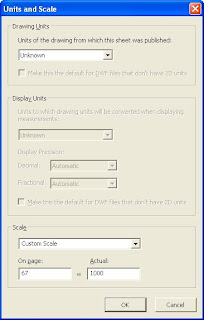

The distance redlines in the drawing should show a dimension that is fairly close.
Monday, April 07, 2008
InRoads
Learning Inroads has been interesting. It's a little wierd having two windows to control the program, the regular Micostation program and a separate one for Inroads. Inroads also works differently from Microstation in that it doesn't save the changes as you change the drawing. I am getting tired of dialog boxes not working the way I'm used to. If you open a surface file and hit open, the dialog box stays open instead of closing and it seems like every dialog box exhibits this behavior. I find this very frustrating after working with Windows based programs for the past 15 years.
Creating alignments and profiles can be vary similar to Civil 3D in that you use different types of segments to make up the portions of the alignment or profile. Modifying them using grips doesn't appear to be possible.
There are some very confusing methods to draw the objects in the dgn file. You have to choose to use a pencil or a pen. The pencil option just creates a temporary graphic of the Inroads object and a pen adds the corresponding linework to the drawing.
The tutorials for Inroads are hard to find. The program, at least in the version I am using, doesn't install with the program and you have to go to the Bentley website to get the files ftp://ftp.bentley.com/pub/knowledgebase/attachments/InRoads_V8.8_Tutorial.zip.
Overall I think I would rate the program slightly over Land Desktop because of the ability to edit the alignments after creation, never did figure out how to do it in Land Desktop. The pencil/pen confusion I have makes it so I can't rate the program higher. I'm only going to use Inroads when required by a project and stick with Civil 3D as my prefered program. I hope to start looking at PowerCivil, but the use of it won't get vary far since the company I work for doesn't have licenses for the program.
Creating alignments and profiles can be vary similar to Civil 3D in that you use different types of segments to make up the portions of the alignment or profile. Modifying them using grips doesn't appear to be possible.
There are some very confusing methods to draw the objects in the dgn file. You have to choose to use a pencil or a pen. The pencil option just creates a temporary graphic of the Inroads object and a pen adds the corresponding linework to the drawing.
The tutorials for Inroads are hard to find. The program, at least in the version I am using, doesn't install with the program and you have to go to the Bentley website to get the files ftp://ftp.bentley.com/pub/knowledgebase/attachments/InRoads_V8.8_Tutorial.zip.
Overall I think I would rate the program slightly over Land Desktop because of the ability to edit the alignments after creation, never did figure out how to do it in Land Desktop. The pencil/pen confusion I have makes it so I can't rate the program higher. I'm only going to use Inroads when required by a project and stick with Civil 3D as my prefered program. I hope to start looking at PowerCivil, but the use of it won't get vary far since the company I work for doesn't have licenses for the program.
Tuesday, April 01, 2008
VBA - Check to See If Alignment Isn't Assigned To Pipe
This is just a quick reminder on how to check to see if an alignment is assigned to a pipe.
If oPipeRef.Alignment Is Nothing Then
' Just a default name that hopefully nobody will use.
dPipeNameRef = "GiberishAlignmentNameDontNameItThis"
Else
dPipeNameRef = oPipeRef.Alignment.Name
End If
If the alignment isn't assigned and you assign the value of the name an error is generated. You can ignore the error, but it may cause problems.
If oPipeRef.Alignment Is Nothing Then
' Just a default name that hopefully nobody will use.
dPipeNameRef = "GiberishAlignmentNameDontNameItThis"
Else
dPipeNameRef = oPipeRef.Alignment.Name
End If
If the alignment isn't assigned and you assign the value of the name an error is generated. You can ignore the error, but it may cause problems.
Subscribe to:
Posts (Atom)
LinkWithin
